

eSIM on Apple iPhone 15 Pro Max: Comprehensive Guide and FAQ
eSIM Compatibility with Apple iPhone 15 Pro Max
Abstract

The Apple Apple iPhone 15 Pro Max fully supports eSIM technology, meaning you can activate cellular plans digitally without inserting a physical SIM card. This gives you greater flexibility in managing mobile plans (even multiple numbers) directly on the device. Keep in mind there are a few regional caveats – for instance, units sold in mainland China or Hong Kong typically lack eSIM capability and use dual physical SIMs instead. Additionally, not all carriers offer eSIM service (some carrier-locked iPhones even have eSIM functionality disabled), so you should verify compatibility with your provider. Activating an eSIM on the Apple iPhone 15 Pro Max is straightforward: usually it’s as simple as scanning a QR code from your carrier and following on-screen prompts to install the digital SIM profile. This digital SIM approach adds convenience, enhances security (since there’s no removable card to steal or clone), and even saves a bit of internal space in the phone’s design. Ready to learn more or set up an eSIM on your Apple iPhone 15 Pro Max? Read on for a step-by-step guide, benefits, and answers to common questions!
Introduction
Welcome, tech enthusiasts and mobile connectivity seekers! This comprehensive guide will walk you through the powerful eSIM capabilities of Apple’s compact Apple iPhone 15 Pro Max. Whether you’re considering an Apple iPhone 15 Pro Max or looking to maximize the features of your current device, understanding eSIM technology will help you unlock more flexibility in how you stay connected. We’ll cover everything from basic compatibility and setup instructions to the benefits of using an eSIM, tips for dual SIM usage, troubleshooting advice, and frequently asked questions. By the end, you’ll know exactly how to leverage eSIM functionality on the Apple iPhone 15 Pro Max – a particularly useful feature for frequent travelers, dual-number users (e.g. personal and work lines), or anyone who appreciates cutting-edge mobile tech. Let’s dive into how eSIM works on this innovative smartphone and what it can do for you.
Does the Apple iPhone 15 Pro Max Support eSIM?
Yes. The Apple iPhone 15 Pro Max is fully equipped with eSIM support, meaning it has an embedded SIM chip inside that allows digital activation of cellular plans. In practical terms, an eSIM (embedded SIM) is a built-in, programmable SIM card that replaces the need for a physical SIM card. This technology lets you add or switch mobile plans directly on your phone via software. According to Apple, eSIM provides greater flexibility, convenience, and security – you can even have multiple eSIM plans stored and switch between them as needed. For example, you might use one plan for personal calls and another for work, or set up a local data plan when traveling abroad, all without fumbling with physical SIM cards. The Apple iPhone 15 Pro Max continues Apple’s eSIM adoption that began with the iPhone XS series, so it fully supports these modern capabilities out of the box.
How to Activate eSIM on Your Apple iPhone 15 Pro Max
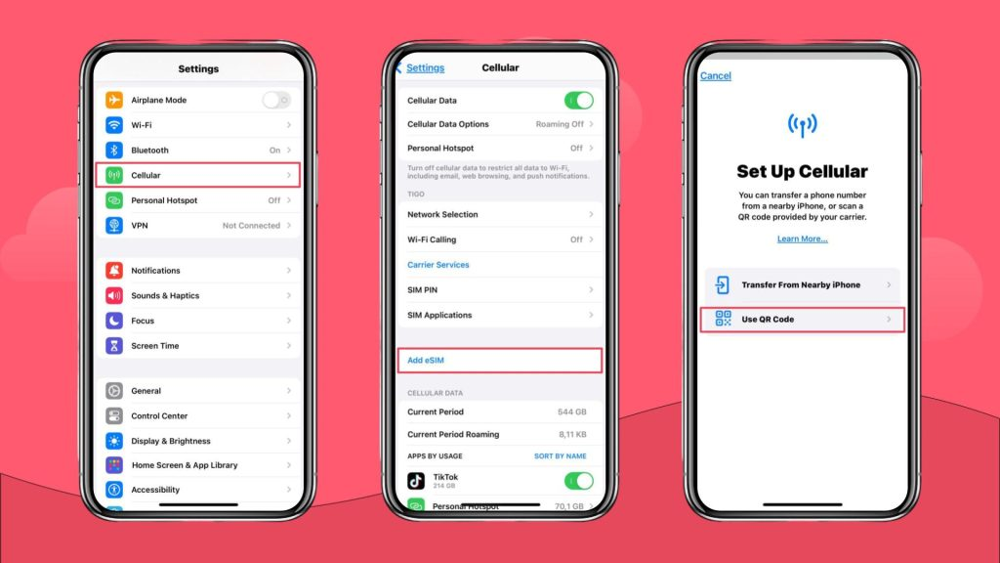
Activating an eSIM on the Apple iPhone 15 Pro Max is a straightforward process. In most cases, your carrier will provide a QR code or activation code that you use to install the digital SIM. Below is a step-by-step guide to adding a new eSIM cellular plan on your device.
Open Settings: On your Apple iPhone 15 Pro Max, go to the Settings app and navigate to Cellular (or Mobile Data, depending on your region’s terminology). Here you’ll see an option to add a new cellular plan.
Add Cellular Plan: Tap on “Add Cellular Plan” (in some iOS versions it might say “Add eSIM” or “Add Data Plan”). This initiates the eSIM setup process.
Scan the QR Code: Use your iPhone’s camera to scan the QR code provided by your carrier for eSIM activation. Position the QR code in front of your camera; you should see a notification like “Cellular Plan Detected”. Tap that notification to continue. (If your carrier sent an activation link instead of a QR code, tapping it should start the eSIM installation process similarly.)
Follow On-Screen Prompts: Your iPhone will walk you through the rest of the activation. You may be asked to confirm adding the new plan. If prompted for a confirmation code or activation code, enter the number your carrier provided (sometimes printed next to the QR code or given via email/SMS). The phone will then add the new cellular plan to your device.
Label and Configure: After activation, you’ll have the opportunity to label the new plan (e.g. “Personal”, “Work”, “Travel SIM”) to distinguish it. The iPhone will also ask how you’d like to use this line – for instance, you can choose which line is primary for voice calls, which for cellular data, and so on. For now, you can pick your preferences (you can always change these in Settings later).
Finish Up: Once the eSIM is added, ensure that the line is enabled (you’ll see a toggle for the new plan in the Cellular settings – it should be switched on by default). You might want to test by making a phone call or using data with that line to confirm it’s working. If everything is correct, the eSIM’s signal bars/carrier name will appear in your status bar.
Travel the world. Stay connected in 190+ destinations.
With eSIM Prime, you get flexible mobile data plans in over 190 countries – along with regional and global options, so you’re always online wherever your journey takes you.
How do I enable eSIM on my Apple iPhone 15 Pro Max?
To activate an eSIM, go to Settings > Cellular (or Mobile Data), then tap Add Cellular Plan. Your carrier should have provided a QR code for eSIM activation – use your iPhone’s camera to scan that QR code and then follow the on-screen instructions to complete adding the plan. The iPhone will automatically detect the new plan and ask you to confirm installing it. If your carrier uses an app or manual code entry instead, you might need to install their app or choose “Enter Details Manually” and input the activation info they gave you. Once done, the eSIM line will appear in your Cellular settings and you can start using it. (Ensure your phone is connected to Wi-Fi or has another data connection during setup, as eSIM activation may require internet access.)
Does Apple iPhone 15 Pro Max have eSIM?
Yes, the Apple iPhone 15 Pro Max fully supports eSIM technology. It has a built-in eSIM (embedded SIM) alongside the physical nano-SIM slot. This means you can use an eSIM to activate a cellular plan without a physical SIM card inserted. Out of the box, every Apple iPhone 15 Pro Max (except certain region-specific models like those for China) is capable of eSIM functionality. In practical use, you can have one active plan on the eSIM and one on a physical SIM, or use the eSIM alone if you don’t want to use a physical card at all. The presence of eSIM in the Apple iPhone 15 Pro Max is part of Apple’s dual SIM implementation for that generation.
Can I use multiple eSIMs on my Apple iPhone 15 Pro Max?
The Apple iPhone 15 Pro Max can store multiple eSIM profiles (often up to 5–8 or more can be stored in iOS), but you can only have one eSIM active at a time on the 13 Mini (in addition to the physical SIM line). In other words, your phone might have several eSIM plans installed (for example, a couple of different travel eSIMs, a personal line, etc.), and you can switch between them in the Settings without re-scanning QR codes each time. However, the Apple iPhone 15 Pro Max’s hardware allows only one of those eSIM profiles to be turned on and used concurrently (the newer iPhone 14/15 in eSIM-only variants allow two active eSIMs, but iPhone 13 series allows one active eSIM + one physical SIM). Switching which eSIM is active is easy: go to Settings > Cellular, and you will see all the eSIMs you have added; you can tap on the one you want to use and turn the others off. This way, you don’t need to delete and re-add eSIMs when swapping – the phone remembers the profiles. But again, simultaneous dual eSIM use (two eSIMs at once) isn’t supported on the 13 Mini – it’s one eSIM and optionally one physical SIM at a time.
Will my eSIM work when traveling internationally?
Yes, absolutely! Your eSIM will work internationally just like a physical SIM — as long as your carrier supports roaming. However, traditional roaming can be expensive and restrictive, which is why many travelers now prefer buying an international eSIM plan instead.
With eSIM Prime, you can instantly download a local or regional eSIM for your destination — whether you’re visiting Europe, Asia, America, or Africa — and enjoy fast, reliable data at local rates. This lets you stay connected the moment you land, without hunting for SIM cards or paying high roaming fees.
The Apple iPhone 15 Pro Max supports dual SIM, meaning you can keep your main number active on your physical SIM for calls or texts while using your eSIM Prime data plan for internet access abroad.
Simply visit esimprime.com, choose your destination, scan the QR code, and connect instantly — it’s the smartest and most convenient way to stay online when traveling internationally.
